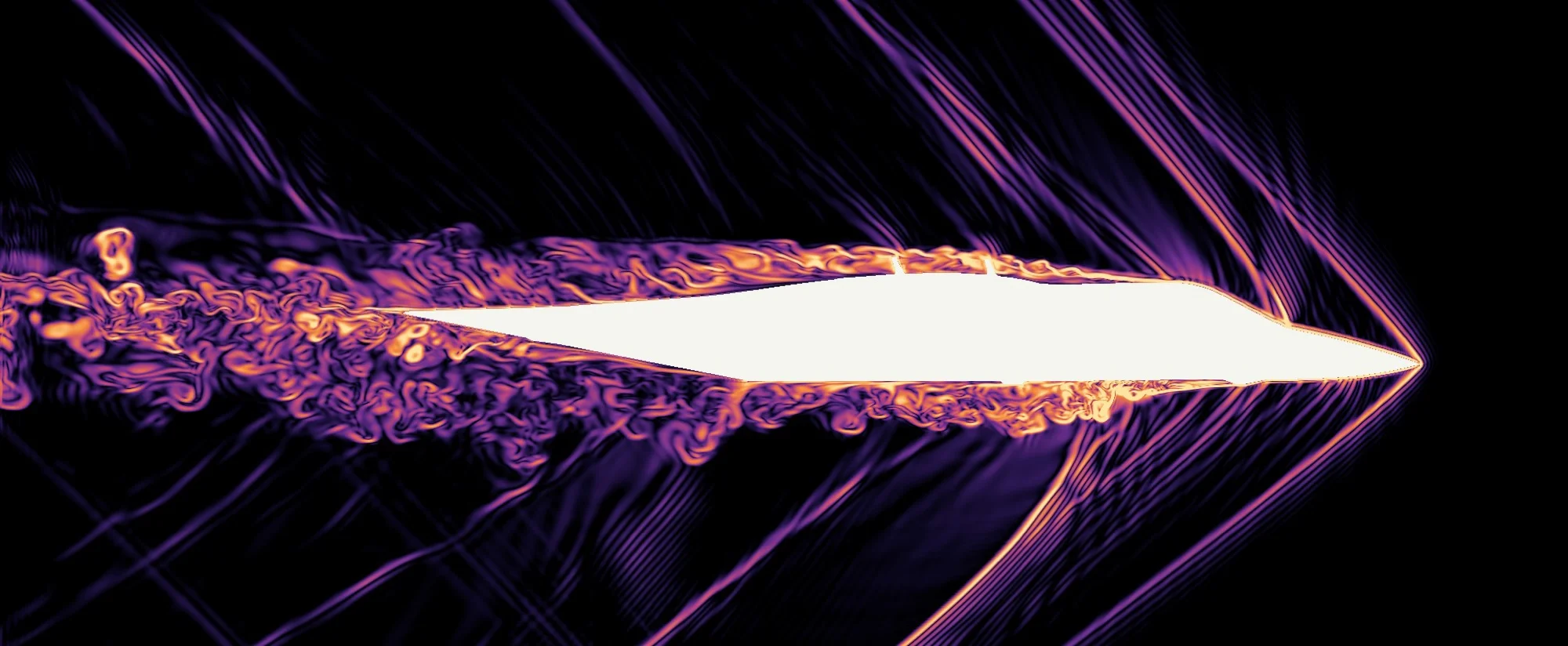
Nose to tail.
Cross-sections of the same Mach 1.6 run. The ring is the bow shock spreading outward. The bloom behind is the wake.
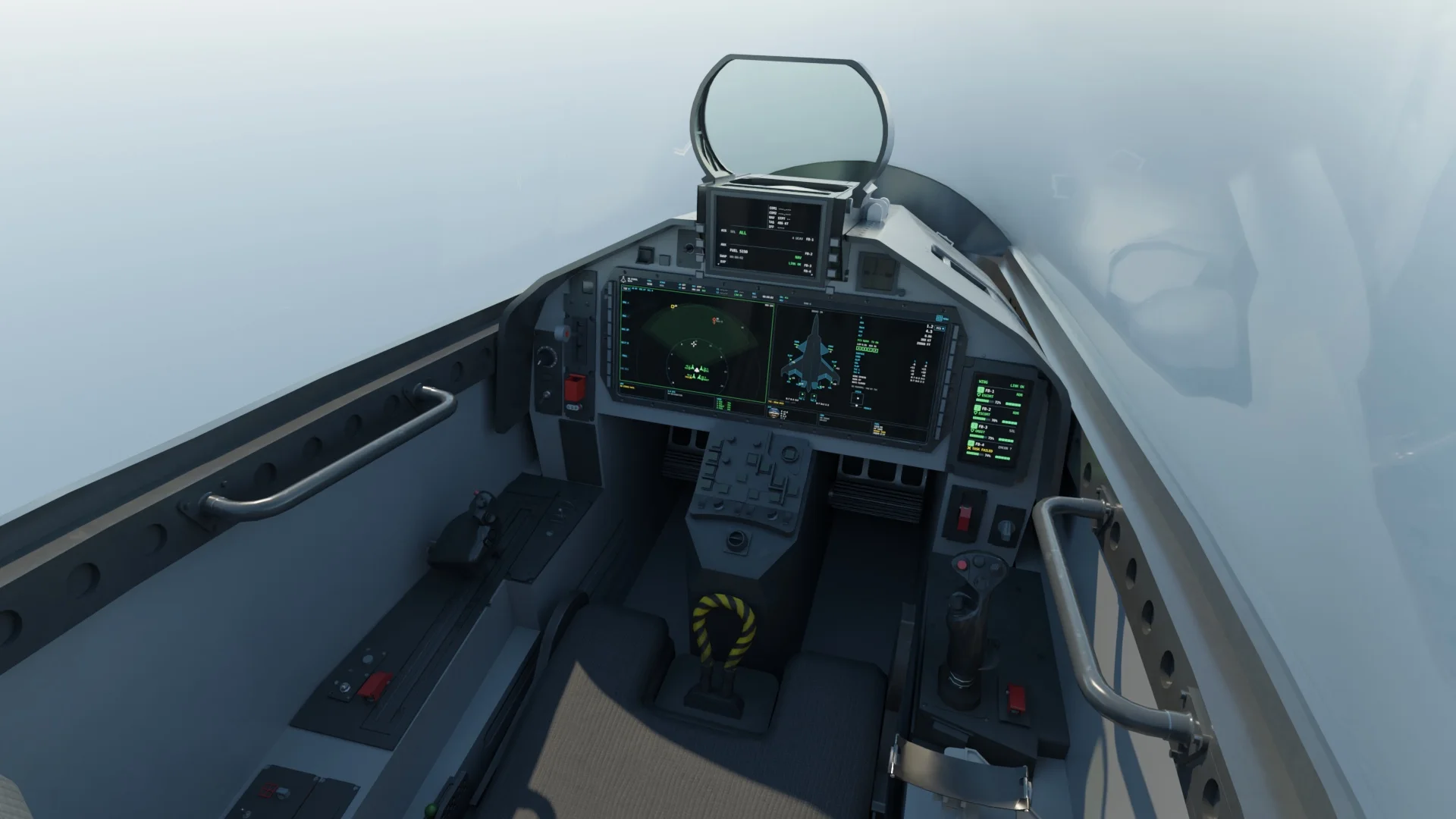
From the pilot's seat.
The wide glass carries the tactical picture and the jet's own systems. The small screen on the right lists the four QEA-36s, their tasks and the state of the link.
I grew up playing Ace Combat. It's an incredibly fun arcade game, but I also take joy in higher-fidelity, realistic simulators like Digital Combat Simulator. DCS, though, has outdated, Cold War era modules, so there's nothing futuristic about it.
There's a reason for that gap. DCS modules are built from real documentation: flight manuals, performance charts and the pilots who flew the aircraft. That's why nearly everything in it is a fourth-generation jet or older. Eagle Dynamics announced an F-35A in January 2025, its first fifth-gen fighter, and it still hasn't shipped. Sixth gen is further out again. The real programs are still prototypes, and almost nothing about how they fly or fight is public, so there's no manual to build one from.
So my plan was: I want something modern in DCS World. I'd take the airframe from Ace Combat 8 and interpolate all of the features a true sixth gen fighter would have, down to swarm control and drone command.
The QEA-36 is the drone version: the same EA36 with the canopy faired over. The end goal is to have a reinforcement-learning policy, trained in a GPU simulator I built called Furball, fly a group of them as your wingmen.
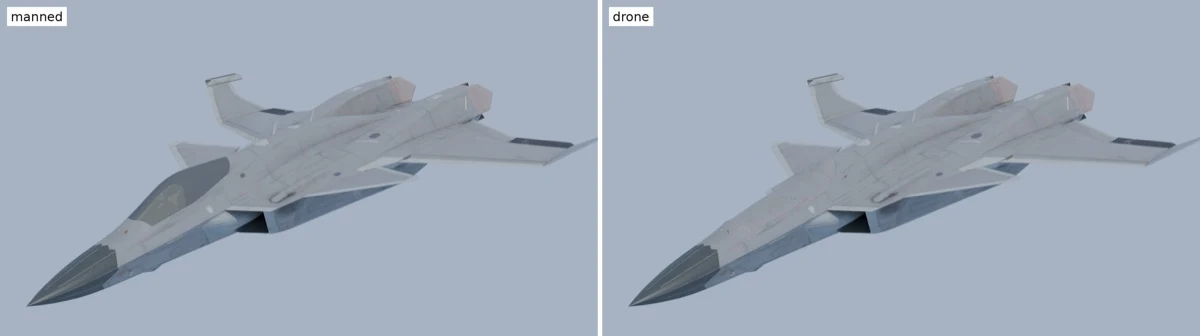
Ace Combat 8's flight model is extremely arcadey and unrealistic. It's built that way so you can do crazy stunts and fly around the map quickly, which is what players expect from an action movie more than a realistic simulator. In DCS World and other milsims I've played, it can be tens of minutes before you're even in the air, and another 10 to 15 before you reach the operation zone. Ace Combat was just built for fun, and you can really see that when you play it. That means its flight model and physics engine are irrelevant to DCS. You have to start from scratch with the model and go from there.
One way to develop a flight model is from first principles: using computational fluid dynamics to understand how the airframe performs in realistic atmospheric conditions. However, the CFD solver I was planning to use didn't support compressible flow. So part of the project was converting it from a standard lattice-Boltzmann method (LBM) into an LBM and compressible-flow supersonic hybrid. More on this in section three.
The 3D model had to be rebuilt too. DCS doesn't take a game mesh as is: it wants its own EDM format, with every moving surface on a numbered animation argument, plus collision and damage shells and its own materials. I run the whole build headless in Blender, and it renders every argument at full travel so I can check nothing breaks. The trickiest part was the split drag rudders. The flight model wanted them on the outer elevons, but the game mesh has each one as a single panel, so I cut every panel down the middle into a clamshell and lined the inside so you never see a gap when it opens.
It also needed things the game never had to show: 135 damage shells covering all 27 of DCS's damage records, landing gear stretched from about 0.3 m of stroke to 1.1 m on the mains, and a hook long enough to actually reach the deck. For the QEA-36, I replaced the canopy with a faired panel blended into the surrounding skin, down to 837 fasteners.
As a side note, while developing and testing this model I realized that Claude Code on my monitor was decent at programmatic functions and traditional coding. But when you're working with CAD models, complicated geometry and 3D figures, you'd really benefit from a Vision Pro adaptation, or an MCP tool for Claude. I had this idea of a spatial Claude Code, which I'll talk about in a future blog post.
The solver is a compressible lattice-Boltzmann code, single precision, in CUDA. It runs on a watertight mesh of 379,594 triangles that stays within 28 mm of the game skin. I tested on 5 cm grids on an RTX 5090, then did the billion-cell runs on B300s, along with RTX PRO 6000s. Before I ran anything, I projected I could complete the full CFD on a single RTX 5090 within 24 hours, which underestimated the true computation. The runs took a lot longer, and I even had to scale down my resolution, the number of voxels, to fit more into less time.
Standard lattice-Boltzmann assumes the air stays at one temperature, which is fine for slow flow but falls apart near the speed of sound. So the version that ran the EA36 is a rewrite in CUDA from the published papers: mass and momentum still go through the lattice-Boltzmann step, energy gets its own finite-volume equation, and at a shock the solver blends toward a sturdier finite-volume flux so the shock stays sharp without blowing up. It also stores five numbers per cell instead of nineteen, which is what let a 5-billion-cell grid fit on one B300.
I chose 1.5 cm cells for the billion-cell runs because the voxel grid's staircase surface adds its own false drag, and I needed that floor well below the drag I was trying to measure. At 5 cm it's 0.0133, at 3.75 cm 0.0101, and at 1.5 cm it drops to 0.0042, under a tenth of the 0.0518 zero-lift drag at Mach 1.6.1
The CFD was validated against test cases from real research papers, covering LBM, subsonic and supersonic compressible flow. I also benched against NASA data for the F-16. But I didn't have a wind tunnel or NASA data for this specific airframe to ground-truth my answers, and the F-16 is a different aircraft. So you have to take those benchmarks with a grain of salt.
This is where I had a bit of fun. There were no standards for this aircraft to benchmark against. But I used real documented reports wherever I could find them: military websites, open research and academic work. From first principles, I combined those benchmarks and physics with my CFD and came to conclusions about carrier landing capability and the fighter's other numbers, including its maximum achievable speed. It came out at a 22.5 t combat weight, 2 × 132 kN of thrust with afterburner, a top speed of Mach 2.25 at 10 km, and supercruise at Mach 1.52.
An arrest needs about 87 MJ, against 64.4 MJ for the Mk 7-3 gear. So I had to imagine an experimental naval variant with a lower trap weight. I imagined gear that could support extremely high g loads to sustain the speeds needed for carrier ops. The model also assumes the carrier has Advanced Arresting Gear, caps trap weight at 19.2 t, and cuts the engines to idle on arrestment.
Wherever the CFD had gaps, the flight model fills them with predictions, and every number in its tables is tagged with where it came from. The first center-of-gravity estimate made the jet far too unstable, a static margin of −22%, to the point where the controls couldn't trim it past about 12° angle of attack, so I moved the CG 0.62 m forward. The control laws use nonlinear dynamic inversion, with one allocator blending twelve control effectors, thrust vectoring included. With no vertical tail, roll rate is limited by how much yaw authority the jet has: 110°/s at Mach 0.6 and 240°/s at Mach 0.9 and 1.6. It stayed controlled in all 18 cases of a carefree-handling test matrix.
I also sized the wing as if someone had to build it. The loads follow the same military standards a real airframe is held to, MIL-A-8861B and JSSG-2006: +9/−3 g at 22.5 t, rolling pull-outs at 7.2 g and a factor of safety of 1.5, across 376 load cases per wing. That came out to a 1,429 kg carbon wing box that bends about 0.35 m at the tip under 9 g, which the 3D model shows through its flex animation. The worst case wasn't the 9 g pull. It was a rolling pull-out at Mach 0.95 at sea level.
The concept behind the cockpit and its UX is human on the loop, not human in the loop. When you're controlling swarms, you want to be less concerned with tactical changes and more concerned with the overall strategic goal.
There's a step-down ladder of situational awareness, similar to Claude Code. You have the primary agent you're interacting with, and you can switch between the other agents you have running. Those agents have sub-agents, but they stay hidden unless you actually need to navigate to them and focus. A human can only process so much, so it's ideal to let the sub-agents run and do their own thing without the human interfering at every step, and to present only the information absolutely necessary for them to be an effective mission commander.
In practice, the main display is a single F-35-style panoramic screen with a layout engine: six presets, touch labels, a status strip and a row of windows. Every drone shows up on every page, and each one shows the order I gave it next to what it's actually doing, so I can see when the two don't match. The link has explicit states too: stale after 1.5 seconds, lost after 10, and any command that isn't acknowledged within 3 seconds gets flagged. Underneath it all are 12 systems devices, 881 parameters and 111 commands, written against DCS's own Lua avionics classes instead of borrowed from another aircraft.
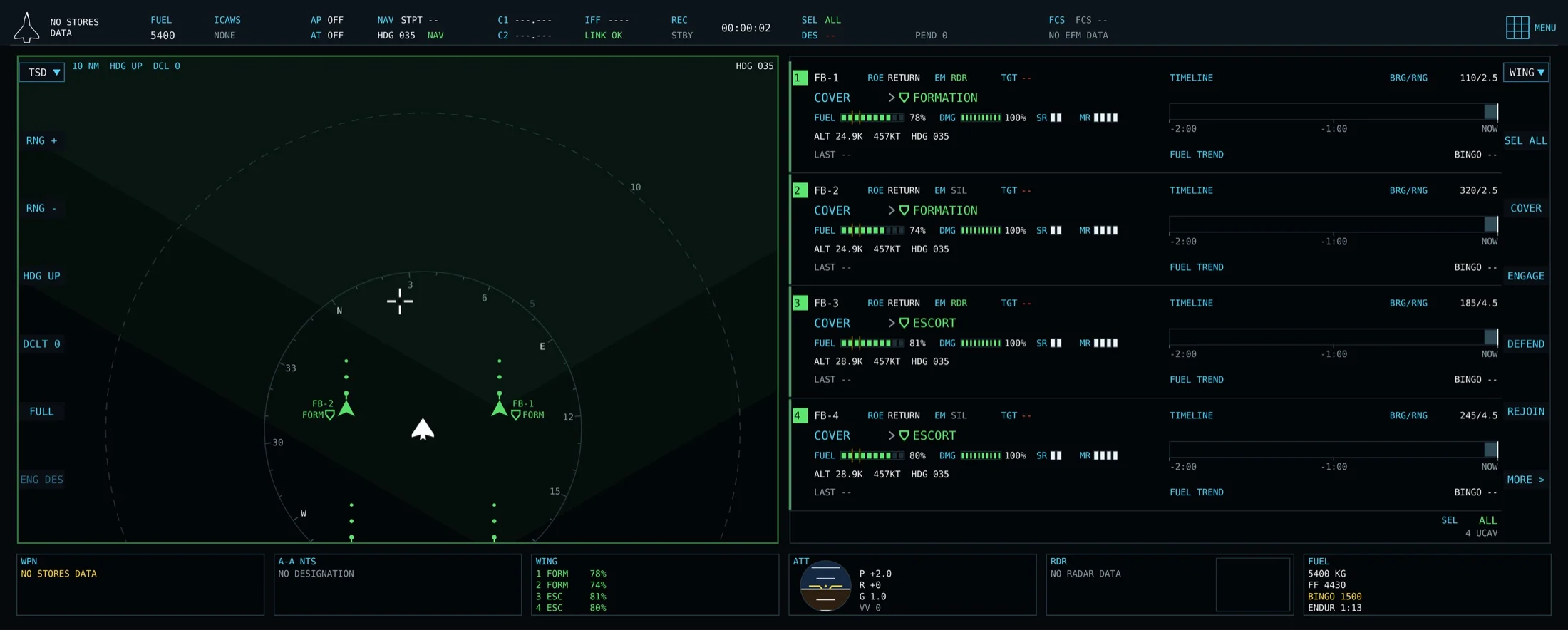
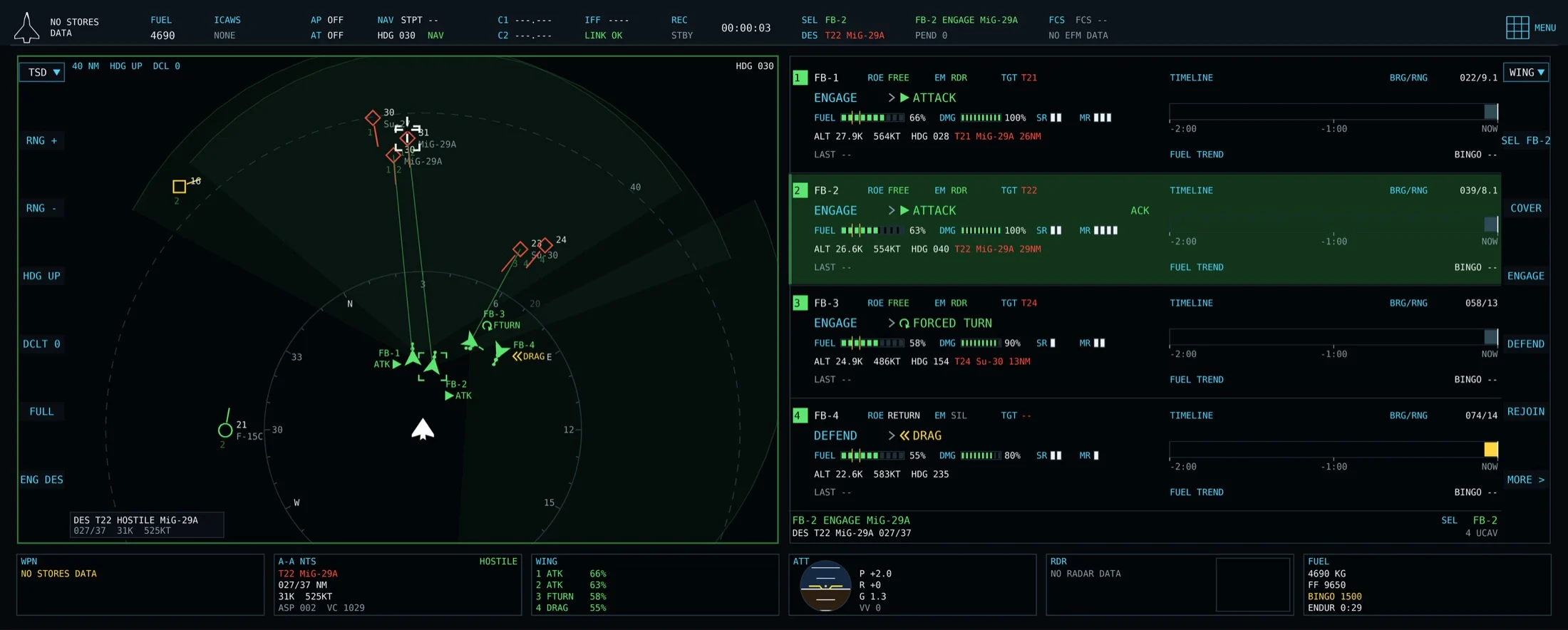
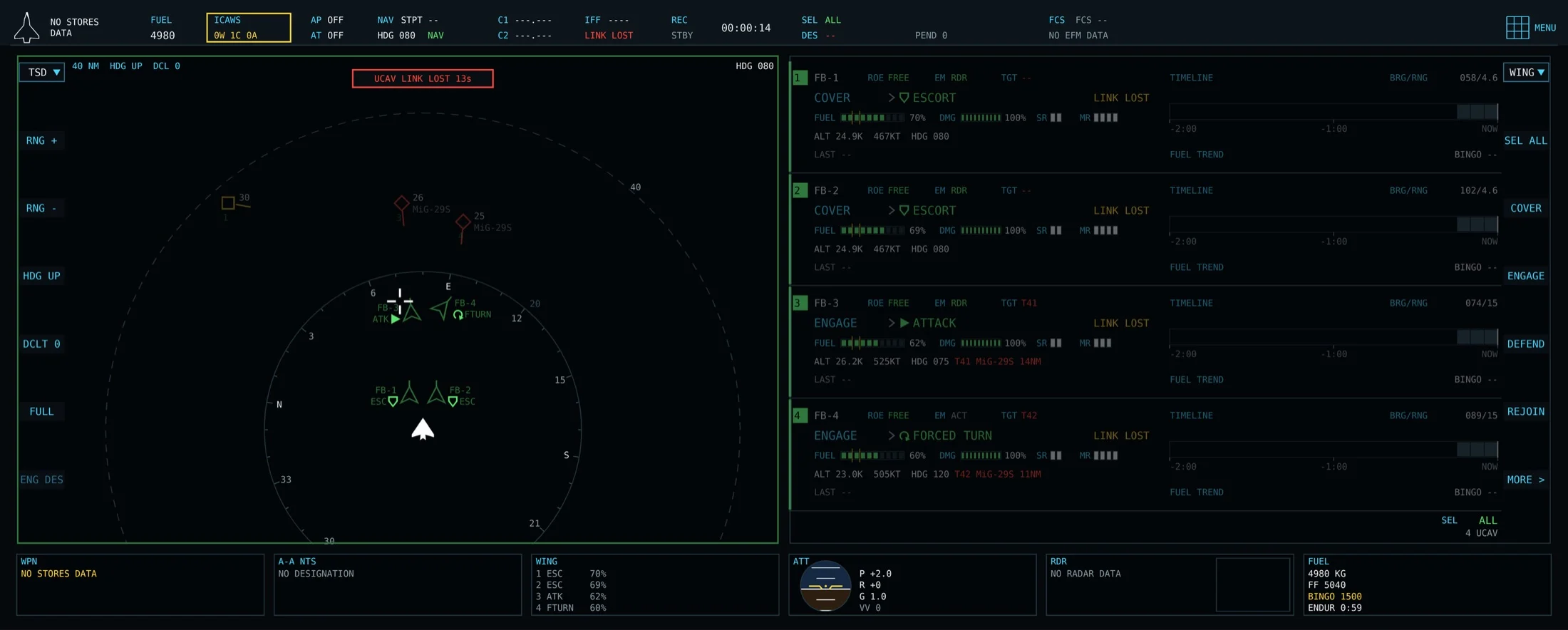
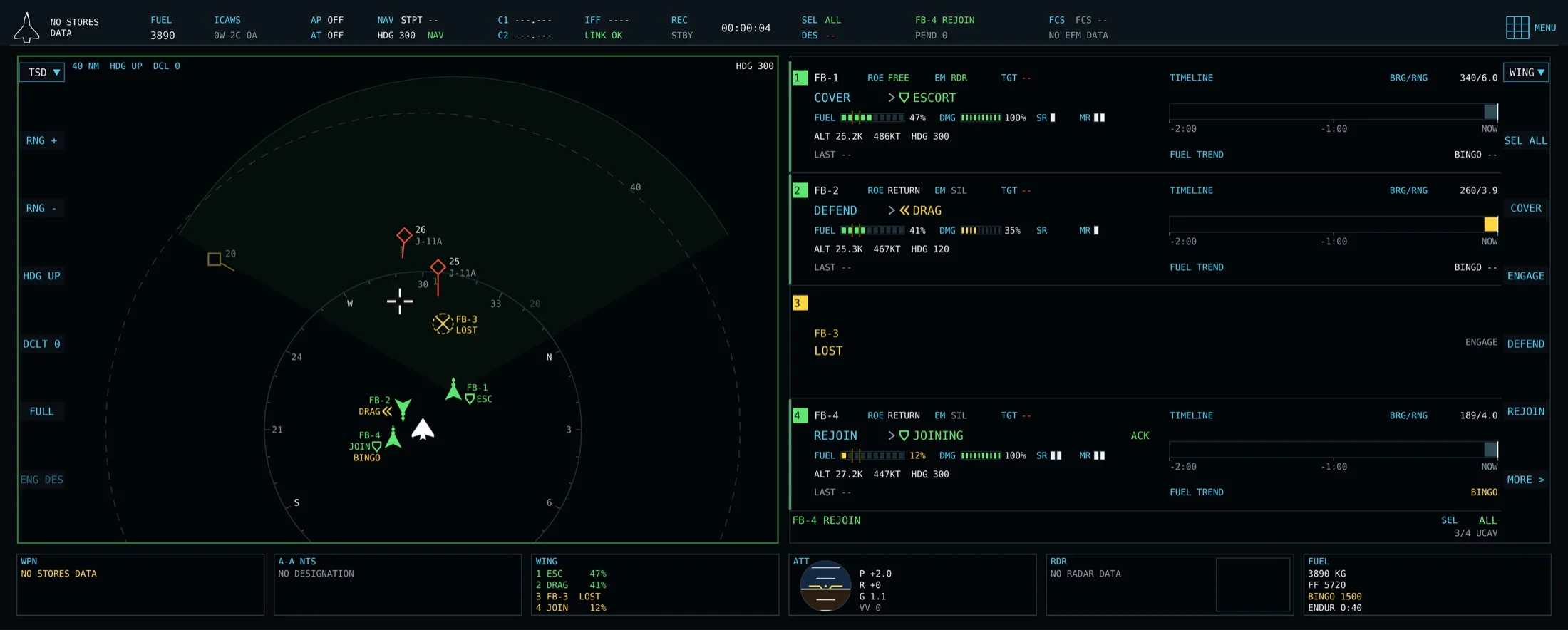
Most real-time strategy (RTS) games don't let you go into first person. It's a good analogy: in an RTS you get a bird's-eye view of the situation and give general orders, but you're not the one aiming, and you're not micromanaging. This cockpit is like an RTS played from the first-person seat: you're flying your own jet while commanding the others.
Behind the cockpit is a Python hub that sits outside DCS and connects the sim, the cockpit and up to four QEA-36s. It merges what every drone sees into one picture, so an aircraft only shows up if one of my drones can actually see it. It groups enemy tracks into raids and proposes how to split the drones across them. Proposals show up dashed. I can approve, veto or swap the shooter, and once I approve, the pairing turns solid. Right now the playbook looks like this:
- Pincer. Two drones split ±40° off the raid's axis and commit at 35 km.
- Grinder. One shooter, straight in.
- Offset. My own jet stays 20° wide with its radar silent.
- Shield. A drone with no missiles left but fuel above 30% holds 12 km toward the threat.
- Decoy. Run to 45 km, then drag for 30 s.
Staying quiet is part of the design. With my radar off, a drone can light up a target and my jet picks up the reflection, so I can hold a track without emitting anything.
There's a misconception in the RL field today that the environment and environment tuning are the difficult part. The real difficulty is reaching thousands or tens of thousands of environment ticks per second, or tens of thousands of parallel environments running at once. These policies are sample-inefficient and on-policy, so every update needs fresh steps from the environment.
Deep learning went through the same thing. In 2012, AlexNet didn't introduce a novel concept: people had been trying deep neural networks since the 1980s. What it proved was that a network scaled up with many layers, on the right hardware and software, could do something remarkable. RL had its own run from 2015 to 2019, with DeepMind's DQN on Atari, OpenAI's Gym, AlphaGo, AlphaZero and OpenAI's Dota agent, and part of why those worked was scaling environments across many thousands of TPUs and GPUs. A normal person without a multi-million dollar budget can't take that approach, because a single workstation or MacBook can't run an environment at that number of steps.
I wrote a Keras-RL2 TensorFlow library to support reinforcement learning, and used it to optimize the vehicle routing problem (VRP) for a large corporation. It was a cold start, with no Uber-like dataset of where vehicles went. So I imagined I could cold start with a simulation: the simulation serves as the environment, I train a policy in it, and then test that policy on the VRP.
That library was confined to running the environment on the CPU and CPU threads. Once you exhausted your threads and cores, you were constrained to your processor's speed. Your agent could run on the GPU while the environment updated on the CPU, with overhead between the two, and complex environments are very slow on a CPU. People in the RL community build incredible libraries with tons of features but miss the most important one: running the entire environment in VRAM on the GPU, converted into CUDA graphs and tensors. Salesforce's WarpDrive showed you could get millions of environment updates per second by keeping all of the environment logic on the GPU. That's also why JAX is great for RL: the environment is just tensor ops.
I built a GPU simulator that runs 1,024 air-combat battles at once, with up to 12 jets each, at about 71,000 world-ticks per second on one RTX PRO 6000, roughly 40 times a serial CPU. Furball models fitted flight envelopes, radar, passive sensors, datalinks, terrain and weather, and the same kernel code runs on both CPU and CUDA, with the two required to agree on every integer outcome. Across all runs, the policy has made about a billion ten-second decisions.2
The policy itself is small on purpose, about 0.75 million parameters. Each aircraft is one token, built from its own state plus a summary of up to eight contacts, and a two-layer transformer lets every jet attend to its teammates. There's no positional encoding, so the order of the jets doesn't matter, and the same network can fly two jets or six. It picks heading, speed, altitude, radar and jammer state and whether to fire, and it chooses targets by pointing at contacts it has a fire-control track on. I also tried a 2-billion-parameter language model as the backbone. It learned the same curve but ran about 60 times slower per hour, so the small network won.
Training uses league self-play in the AlphaStar and OpenAI Five style: a main agent, a pool of its past snapshots, 8 scripted opponents, a fresh exploiter each cycle that hunts for its weaknesses, and 3 opponents held out of training entirely.
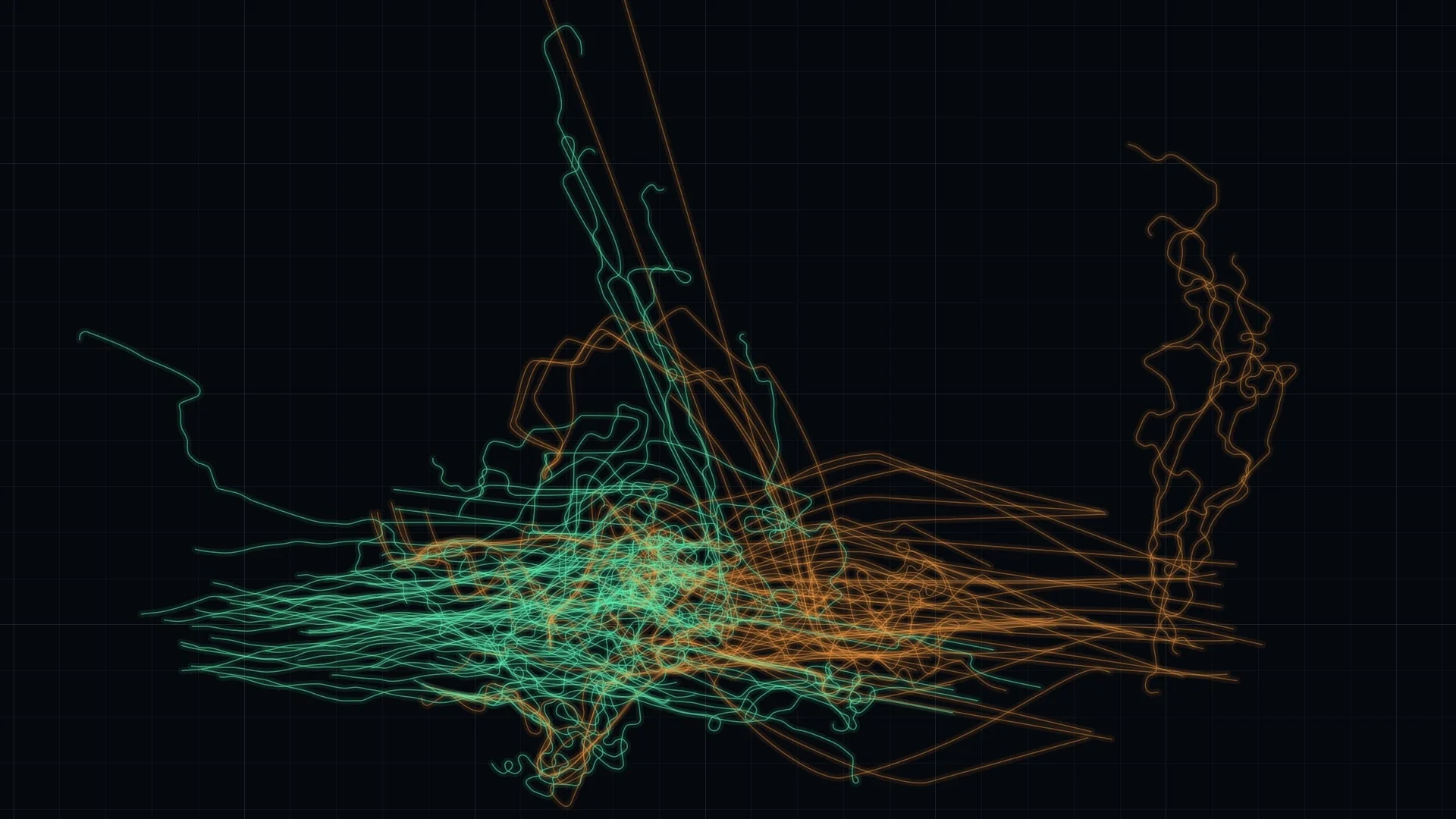
I experienced a lot of reward hacking. In early iterations, agents avoided combat entirely, because saving their aircraft scored high enough to beat actually engaging. They would just fly in circles around their spawn. A harsh death penalty collapsed decisive battles from 59% to 5%. Two other failures taught me as much:
- It aimed at contacts it could hear but not see. More than half of its long-range shots were refused because it had picked a datalink or passive contact instead of its own radar track. Once I limited targets to its own fire-control tracks, it came out ahead against every opponent for the first time.
- Zero-sum canceled out the reason to close in. A reward for closing distance canceled out between the two sides, so nothing paid it to cross a 200 km gap. Applying that reward after the zero-sum step took launches from 4.6 to 20 per battle.
Once it did fight, the first useful trick it found was to turn away and let the scripted enemy waste its missiles on a hard target, then turn back in. Later it learned to fire from closer in, at 61% of max range versus the scripted opponent's 93%, and got 1.8 times the kills per missile.
It still needs to be trained, improved and iterated on. The best checkpoint has no losing matchup against any scripted or held-out opponent across six scenario families, with an average margin of +0.55. On real-world geography it's roughly even, +0.03 over 32 theaters.
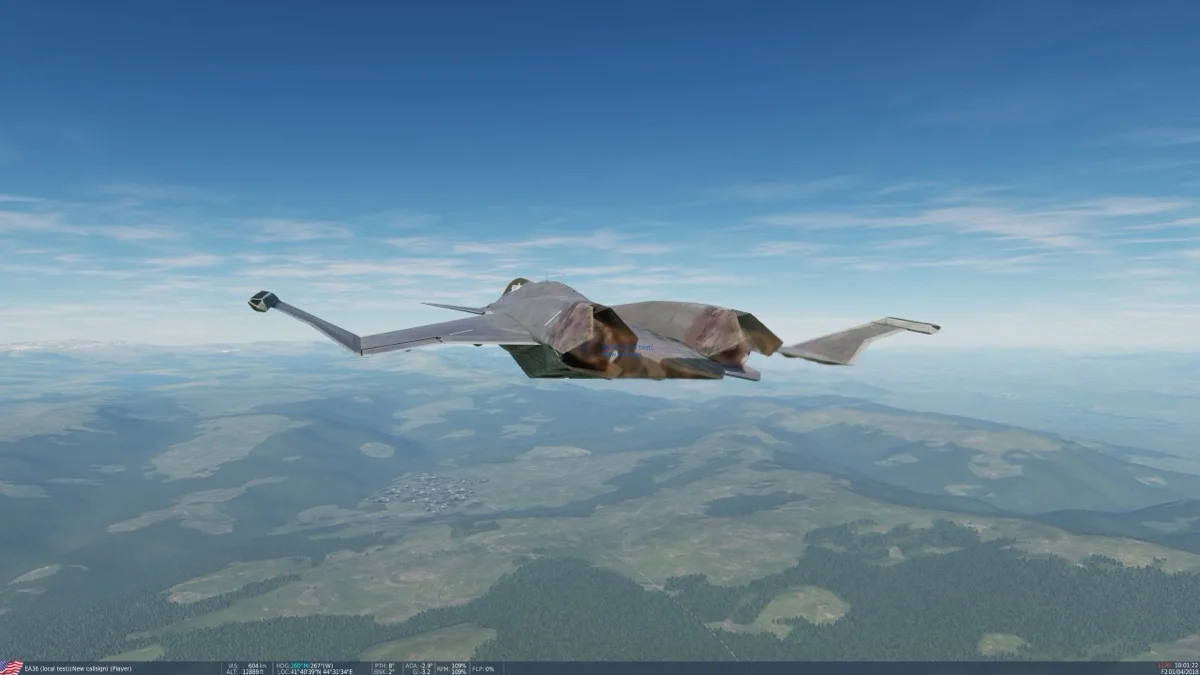
The DCS integration is still in an MVP state. The aircraft flies, and things are articulated and animated properly. The agentic and swarm logic is still being worked on. I have a policy that works, but I want an optimal policy, one that's superior to DCS's own AI.
More details to come in Part 2.